OLED monitors have changed quite a bit since the first Alienware AW3423DW came out in 2022. We’ve gone from 175Hz ultrawides to 500Hz 1440p panels, 4K 240Hz monitors, and some rather ridiculous dual-mode displays. Brightness has improved too, and manufacturers have started fixing things like text fringing that early OLED monitors were pretty notorious for.
The names, however, are a complete mess. You’ll see 3rd generation, 4th generation, Penta Tandem, Primary RGB Tandem, V-Stripe, RGB-stripe and plenty more. Some refer to the OLED emitter structure, some refer to the arrangement of subpixels, and others are just the name a manufacturer chose for its newest lineup.
So here’s a reference for the OLED panels you’ll actually come across in monitors, with the important differences explained.
QD-OLED // Samsung’s Approach
QD-OLED starts with blue OLED light and uses quantum dots to convert some of it into red and green. Because it doesn’t need the extra white subpixel found on conventional WOLED, it tends to retain better saturation in bright, colourful HDR highlights. I’ve covered the technology in more detail in Monitor Panels 101.
The Early Generations
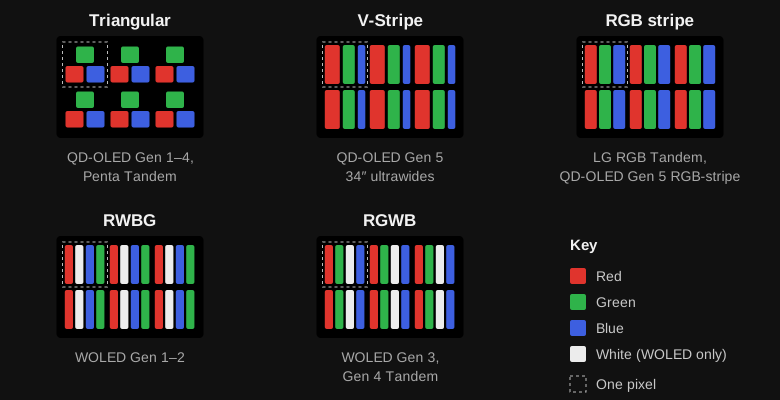
The first widely available QD-OLED gaming monitors used 34-inch 3440×1440 panels, like the AW3423DW and AW3423DWF. These were 165–175Hz displays with a triangular subpixel arrangement. They were pretty impressive for the time, but the unusual layout wasn’t particularly kind to desktop text. Coloured fringes around sharp edges were relatively easy to spot.
Later panels brought higher refresh rates and more sizes. By the third generation, we had 27-inch 1440p 360Hz and 32-inch 4K 240Hz monitors. The 4K panels are noticeably better for text simply because their pixels are so small, although they still don’t use a conventional RGB stripe.
Penta Tandem and V-Stripe
This is where things get confusing. Penta Tandem refers to the emitter stack, not the subpixel layout. You can have a Penta Tandem QD-OLED panel that still uses the older triangular arrangement. The 32-inch 4K 240Hz MSI MPG 322UR QD-OLED X24 is one example covered by Club386.
V-Stripe is different. Samsung Display rearranged the red, green and blue subpixels into a layout that behaves more like the RGB arrangement desktop operating systems expect. The newer 34-inch ultrawide panels, including the Alienware AW3426DW, use it. Text clarity is one of the more meaningful improvements here, especially if you spend a lot of time outside games. Monitors Unboxed’s AW3426DW review is a useful reference.
One thing to remember: a newer generation doesn’t automatically mean V-Stripe. Check the actual panel.
WOLED // LG Display’s Approach
Conventional WOLED uses white-producing OLED emission and colour filters for red, green and blue, plus a fourth white subpixel to boost brightness. The tradeoff is colour volume. Once the white subpixel contributes heavily, bright saturated colours can start to look less saturated than they do on QD-OLED.
WOLED’s bigger advantage is its handling of ambient light. Its polariser generally keeps blacks looking black in brighter rooms, whereas QD-OLED panels can look purplish or grey when external light hits them. Newer QD-OLED coatings have improved this, so I’d still judge individual monitors rather than assume one is always better.
From Early WOLED to Tandem
Early 27-inch WOLED gaming monitors, like the LG 27GR95QE, were 1440p 240Hz. Later versions improved brightness, and subsequent panels pushed refresh rates much further, including 480Hz 1440p and dual-mode 4K 240Hz / 1080p 480Hz monitors.
LG Display’s fourth-generation Primary RGB Tandem technology uses a newer multi-stack emitter arrangement to improve luminance and efficiency. You can find it on 27-inch 1440p 280Hz and 540Hz monitors.
But Tandem doesn’t mean RGB-stripe. Plenty of these models still use four subpixels (RGWB). Some newer WOLED monitors instead use a three-subpixel RGB-stripe arrangement, dropping the separate white subpixel. The ASUS PG27UCWM, PG32UCWM and Alienware AW3926QW are examples of that direction. TFTCentral has a useful explainer on the layout changes.
The upside is better compatibility with text rendering and less reliance on the white subpixel. There are still compromises though, including some viewing-angle colour shift on particular RGB-stripe implementations. A new layout isn’t a free upgrade in every respect.
What Actually Matters?
Subpixels and Text Clarity
Older triangular QD-OLED and four-subpixel WOLED layouts don’t line up neatly with how Windows typically renders fonts. That can leave coloured edges around text, especially on lower-PPI displays. Higher pixel density makes the issue less noticeable, while RGB-stripe layouts tackle it more directly.
If you’re choosing between two 4K OLEDs for gaming, I wouldn’t obsess over their subpixels. If you’re choosing a 1440p OLED for eight hours of desktop use, I’d pay considerably more attention.
Coatings and Black Levels
Glossy doesn’t automatically mean better, and matte doesn’t automatically mean bad. A glossy WOLED can maintain deep blacks in a well-lit room, while a glossy QD-OLED may still show raised blacks because of how the panel interacts with ambient light. Coatings can also change how reflections look without changing the underlying panel.
TFTCentral’s black-depth comparisons are well worth looking at before buying an OLED for a particularly bright room.
Brightness, ABL and HDR
This is probably the easiest area to misread on a spec sheet. A monitor advertised as 1,300 nits might only reach that figure with a tiny HDR highlight. It doesn’t mean a white desktop will be anywhere near 1,300 nits.
Full-screen SDR brightness, small-window HDR peaks and brightness in real HDR scenes are different measurements. OLEDs are subject to Automatic Brightness Limiting (ABL), so larger bright areas generally reduce the light available to each pixel.
And don’t assume that every monitor using a panel capable of DisplayHDR True Black 500 actually has that certification. Firmware, power limits and product positioning can all change the result. In particular, a cheaper downbinned model can use essentially the same panel while being capped at lower brightness.
Grey Banding and Uniformity
Some newer Tandem WOLED panels show visible bands on very dark grey content. This isn’t necessarily something you’ll notice while gaming, but it can be pretty annoying if it appears in the games or applications you actually use.
TFTCentral’s investigation covers the near-black behaviour in detail. Sample variation matters, and I wouldn’t assume every unit performs identically.
Burn-in and Longevity
OLED materials do wear with use, and uneven wear is what causes burn-in. It’s a much smaller concern than it used to be though. Pixel shifting, compensation cycles and other safeguards have substantially reduced the risk, and WOLED in particular holds up remarkably well. A warranty is still worth having, so read the actual terms, including whether burn-in is covered.
I’d happily use OLED for gaming and general desktop use. If the exact same layout is going to sit on screen for most of every working day, lean towards a model whose warranty explicitly covers burn-in.
So, Should You Buy the Newest Generation?
Not necessarily. I’d take a well-priced older OLED with good measurements, sensible HDR behaviour and a decent warranty over a newer model that happens to have a larger generation number on its box.
Newer panels can be genuinely better. RGB-stripe can improve text clarity, newer emitter structures can help with brightness and efficiency, and higher refresh rates are nice for competitive gaming. Just make sure the improvement you’re paying for is one you’ll actually notice.
For a much broader generation-by-generation breakdown, Drake’s OLED cheatsheet is also worth keeping bookmarked. I’ve used it alongside independent reviews and panel-maker information while putting this reference together.
OLED Panel Reference
The panel-family table follows this article. I’ve separated QD-OLED and WOLED, along with the subpixel layouts, resolutions, refresh rates and example monitors. The generations are practical groupings, not a universal naming system. Two displays marketed as the same generation can use different layouts or achieve different brightness.
The refresh rates refer to panel variants, not necessarily every monitor listed in a row. Overclocked and lower-resolution dual modes shouldn’t be mistaken for native-resolution refresh rates. Announced and prototype panels are labelled separately.