When buying a monitor, you’ll definitely come across terms like IPS, VA, TN, and OLED. These words tell you what kind of monitor it is, and they can tell you quite a bit about how a display might perform before you’ve even used it. Contrast, viewing angles, response times, and several other things are greatly affected by the panel technology, though the implementation matters just as much.
TN // Past Its Prime
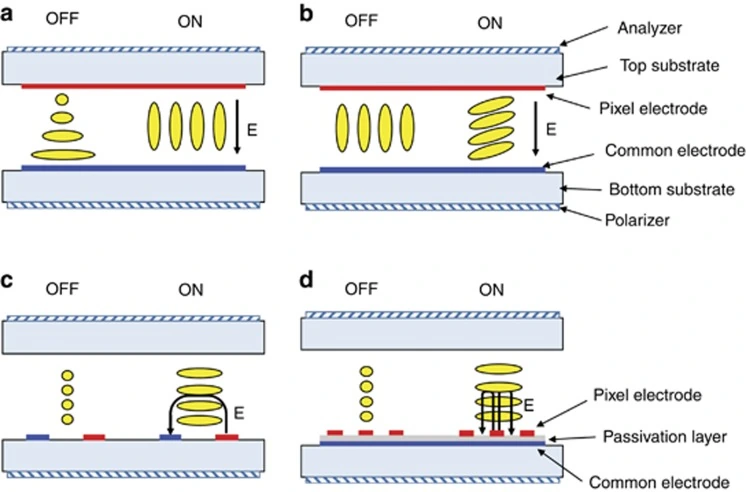
Twisted Nematic is one of the oldest LCD technologies still used in monitors. Its liquid crystals are arranged in a roughly 90° twist when at rest, and change when voltage is applied to allow controlled passage of light. This setup formerly allowed TN to achieve faster response times than other LCD technologies, making it particularly popular among competitive gamers.
Sadly, TN’s other features are…bad. Viewing angles are really poor, with obvious changes in colour and gamma from small changes in position. Contrast usually sat around 1000:1, and colour reproduction wasn’t great either. These could be justified when TN had a substantial speed advantage, but that isn’t really the case anymore.
Plus with 24 inch 1080p OLED monitors entering the market, TN’s remaining niche is about to go poof. As far as I’m concerned, TN is obsolete.
VA // John Contrast
Vertical Alignment panels set up their liquid crystals perpendicular to the glass when at rest, allowing them to block considerably more light than other panels. This gives VA its biggest advantage, native contrast. It commonly reaches 2500:1 to 4000:1, producing deep blacks and nice depth in darker scenes. It’s quite appealing for movies and games played in dim environments.
The issue is response times, especially during darker transitions. VA panels have historically struggled to move between low grey levels quickly, producing black smearing where dark objects leave visible trails during motion. Overdrive can help, but too much creates overshoot and inverse ghosting. Some modern VA panels perform really well, but the variation between models is substantial enough that I’d always check proper response time measurements before buying one.


Viewing angles suck too. VA suffers from gamma shifts when off axis, which can make darker tones appear washed out as you move away from the centre. On bigger flat panels, this can become noticeable towards the edges even when you’re sat directly in front of the monitor.
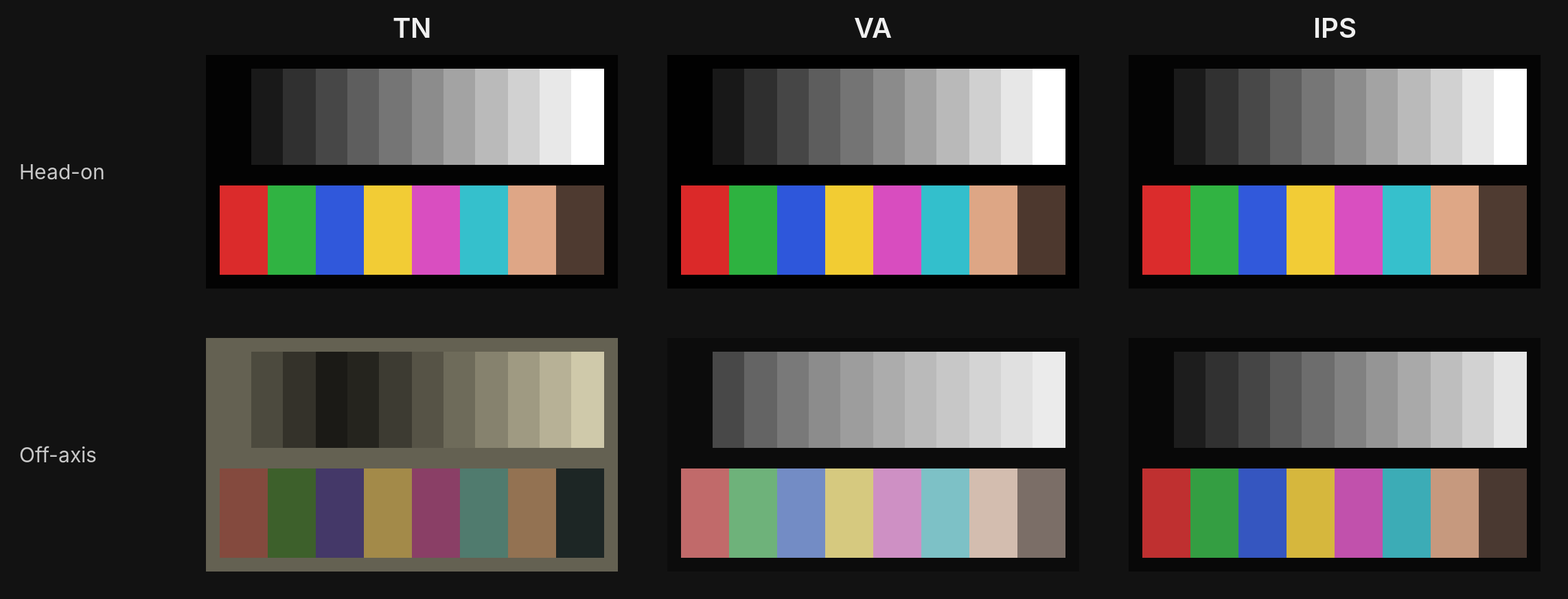
I quite like VA’s contrast, but I’d be wary about recommending it.
IPS // Do It All
In Plane Switching uses liquid crystals that rotate parallel to the glass, helping maintain relatively consistent colour and gamma across different viewing angles. This makes IPS quite useful for colour sensitive work and general desktop use, and improvements in liquid crystal response times have allowed modern IPS monitors to compete with TN in high refresh rate gaming.
Its biggest weakness though is contrast. Most IPS panels sit around 1000:1, making blacks appear greyish in darker environments. Oh, and IPS glow. A light haze that’s noticeable around the corners when displaying dark content. Its visibility changes with viewing angle and distance, and it shouldn’t be confused with backlight bleed, which has a different cause.
You’ll also encounter names like Fast IPS and Nano IPS, but I wouldn’t treat them as separate panel technologies. Fast IPS just refers to implementations optimised for response times, and Nano IPS is just LG’s way of saying “big colour gamut”. Neither guarantees good performance so disregarding them entirely would be better. IPS Black is pretty interesting, offering native contrast ratios around 2000:1 while retaining the viewing angle advantages of IPS. The one bad thing about it is that it’s limited to office monitors.
For most people, IPS is the gold standard. It’s pretty fast, consistent, and rather pleasant to use provided you can live with mid contrast.
OLED // Individuality
OLED, or Organic Light Emitting Diode, uses self emissive pixels and not a backlight. Each pixel can just switch off, producing essentially infinite contrast. Pixel response times are also basically instant, so OLED is well suited to high refresh rate gaming. Once transitions are that fast, refresh rate and image persistence become much larger limitations on motion clarity.
There are some compromises of course. The materials slowly degrade with use, and uneven wear can eventually cause permanent burn-in, particularly with static UI elements. Modern monitors use compensation cycles and other protective measures and have substantially reduced the risk. Automatic Brightness Limiting, or ABL, is another consideration, reducing luminance when larger portions of the screen demand high brightness. This can make large white windows noticeably dimmer than small HDR highlights.
OLED monitors can also exhibit some pretty bad VRR flicker during larger frame rate fluctuations, notably in darker content, while some subpixel layouts cause colour fringing around text. Newer generations have improved text clarity considerably though.
The two main OLED implementations you’ll encounter in monitors are W-OLED and QD-OLED, each with its own approach to producing colour. Be aware that neither name tells you which generation you’re getting. At 27 inch 1440p alone there are twelve different OLED panels on sale, with a thirteenth due in early 2027, and some cheaper newer models quietly use older or cut down panels. Check exactly which panel a monitor uses before buying.
W-OLED // LG’s Approach
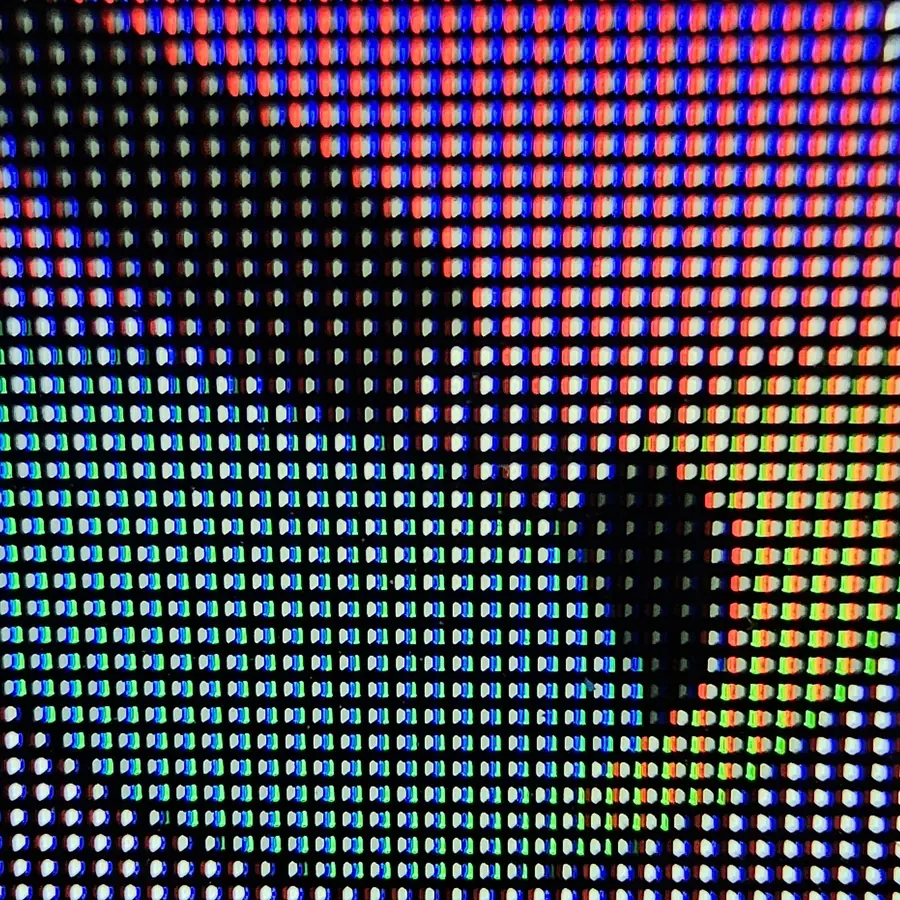

W-OLED uses a white emitting OLED structure alongside colour filters to produce red, green, and blue. Conventional W-OLED monitor panels also use an additional white subpixel to improve brightness, but this comes with a major tradeoff. As the white subpixel contributes more luminance, particularly bright colours can lose saturation, and lower APL scenes are frequently subject to things like pulsing due to the same.
One advantage W-OLED has is its polariser, which helps maintain deeper blacks under ambient lighting. This makes it particularly useful in brighter rooms, where QD-OLED’s black levels can become visibly raised. W-OLED can also suffer from near black uniformity issues, including vertical banding on dark grey backgrounds, which I’ve covered separately in my grey banding article.
The layout itself has also been reshuffled. LG Display’s first 1440p panels used RWBG, which puts green and blue in the wrong order for Windows’ subpixel font rendering. From the 480Hz panel onwards they moved to RGWB, which fixes the order and improves text, though the white subpixel is still there.
The current 1440p W-OLED lineup is pretty simple. The 280Hz and 540Hz panels use LG Display’s four layer tandem OLED, the biggest upgrade so far: up to 330 nits SDR and 1500 nits peak HDR. The 540Hz version also has a dual mode, running at 720Hz at 720p. Cheaper 240Hz glossy W-OLEDs are still around, but they use the older non-tandem panel, even when the monitor itself came out in 2026.
LG Display’s newer RGB stripe OLED panels remove the additional white subpixel, addressing some of the colour volume limitations of conventional W-OLED. The tradeoff is lower peak brightness in certain implementations, plus a colour shift on bright backgrounds at wider viewing angles (a greenish tint), since the narrower black matrix lets light spill between subpixels. I’m particularly interested in seeing how these develop, since removing the white subpixel tackles one of W-OLED’s more obvious weaknesses.
QD-OLED // Samsung’s Take
QD-OLED uses blue OLED emitters alongside quantum dots that convert part of the blue light into red and green. This avoids the additional white subpixel found in conventional W-OLED and allows QD-OLED to maintain excellent colour saturation at higher brightness levels. Bright, colourful HDR content is where that advantage becomes particularly noticeable.
The main weakness is ambient light performance. QD-OLED panels lack a polariser which allows external light to reach internal layers and raise black levels. Earlier panels were particularly prone to a magenta tint under bright lighting conditions, although newer coatings (“QuantumBlack”) have improved this considerably. Monitor brands tend to rename it, so ASUS BlackShield and MSI Dark Armor are the same idea.
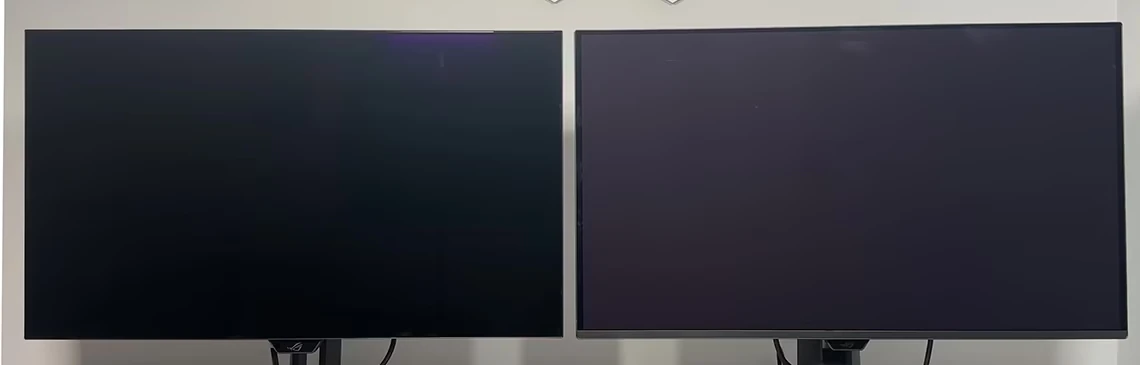
QD-OLED’s triangular subpixel layout also causes visible colour fringing around text. Newer layouts (V-Stripe) and higher pixel densities have helped, but every 27 inch 1440p QD-OLED currently on sale still uses the triangle. The first one with an RGB stripe, a 400Hz panel, is due in early 2027.
The biggest trap with QD-OLED is the Edge panel. Samsung Display’s cheaper Edge panels, at 240Hz and 180Hz, are limited to about 200 nits SDR and 400 nits HDR, against 250 and 1000 nits on the regular 240Hz panel. Both get sold as “240Hz QD-OLED”, so it’s easy to end up with the dimmer one. The 280Hz panel usually costs only a bit more and keeps full brightness. At the top end, the newer 320Hz panel moves to Samsung’s five layer Penta Tandem design with QuantumBlack and up to 1300 nits peak, which makes it the first real step up from the original 2024 panel.
In conclusion, QD-OLED generally has the advantage in colour volume, while W-OLED tends to behave better under ambient light and is way more durable. The particular monitor, its coating, and your room conditions matter more than the name.
MiniLED // Solid Backlighting
MiniLED replaces a conventional LCD backlight with hundreds or thousands of smaller LEDs arranged into independently controlled dimming zones. These zones can brighten or darken depending on the image, allowing IPS and VA panels to achieve much better contrast in HDR while maintaining the high sustained brightness LCDs are known for.
The limitation is that each dimming zone still covers multiple pixels. When a small bright object appears against a dark background, the surrounding area can become illuminated too, producing blooming (especially on IPS). More zones help, but the local dimming algorithm matters a lot too.
MiniLED can be pretty impressive with bright HDR content, where its sustained luminance far exceeds what OLED can manage. Darker scenes are harder, especially when small highlights trigger blooming, HDR isn’t tonemapped well, or the FALD algorithm dims things excessively to preserve black levels. Some implementations also struggle with EOTF tracking, meaning the brightness of certain tones can differ from what the content intended.
For darker movies and games, I’d prefer OLED because of its per pixel light control. However, a good MiniLED monitor can be fantastic for brighter HDR content like games.
Conclusion
For LCDs, I’d recommend IPS unless you specifically want VA’s stronger contrast. TN has very little left to offer, so I can’t really say much there. OLED is my personal preference for, well, everything, even though brightness is still somewhat iffy, while MiniLED makes a strong case for itself in bright HDR environments.
Just remember that panel technology only gives you a very rough idea of what to expect. Two monitors using the same technology can perform very differently, especially when it comes to response times, overshoot, uniformity, and HDR performance. Always put proper measurements ahead of whatever terminology the manufacturer decides to advertise.