Whenever you see “1ms response time” on a monitor’s marketing, it’s not really worth paying attention to. The same goes for refresh rates, to a point. A 240Hz or 360Hz monitor sounds fast, but how clear it actually looks in motion comes down to whether its pixels can keep up, and the spec sheet won’t tell you that. Measurements will.
The “1ms” Problem
Most brands advertise the single fastest GtG (grey-to-grey) transition they can achieve, often with overdrive settings that introduce ridiculous amounts of overshoot. Some LCDs can technically hit 1ms, but that doesn’t mean the rest of their transitions are anywhere near as fast. The slower ones are what cause ghosting and smearing, particularly when pixels can’t finish changing before the next frame arrives.
GtG vs MPRT
To make things worse, brands sometimes show off MPRT instead. GtG is actual pixel transition speed. MPRT, on the other hand, describes how long a moving image remains visible to your eyes, and is heavily influenced by refresh rate and techniques like backlight strobing. That’s how you end up seeing “0.5ms” on monitors whose actual pixel transitions might take 6–8ms.
So if neither number on the box means much, what does?
Refresh Rate Compliance
Refresh rate compliance measures the percentage of pixel transitions that finish within the time available for each refresh. At 144Hz, a monitor has roughly 6.94ms per refresh. At 240Hz, that drops to just 4.17ms, and at 360Hz, it’s only 2.78ms.
If a transition takes 7ms on a 240Hz monitor, the next refresh has already started before the pixel reaches its intended colour. You end up with ghosting and smearing, even though the monitor is technically refreshing 240 times every second. More Hz does mean better motion clarity, but only if the pixels can keep up.
This is especially common with VA panels, where darker transitions can be considerably slower than brighter ones. That’s why some high-refresh-rate VA monitors still exhibit pretty nasty black smearing despite having impressive specs on paper.
What Counts as Good?
For 100% compliance at 240Hz, every measured transition needs to finish within approximately 4.17ms, according to whatever thresholds the reviewer uses. That’s a pretty demanding target, and reviewers don’t really expect it. Around 80% or more is generally considered acceptable, and Hardware Unboxed called 70% enough for the Alienware AW2721D to count as a true 240Hz display.
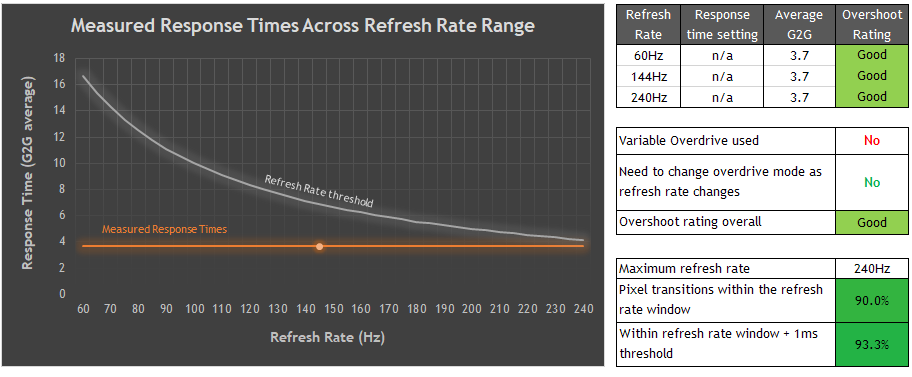
At the other end, some monitors score below 50% in certain overdrive modes, meaning fewer than half of their measured transitions finish in time. The Philips Evnia 27M2N5500XD is an extreme case. In its 1000Hz mode, Monitors Unboxed measured just 31.8% compliance, with an average response time of 6.85ms against a 1ms window. These percentages depend on the reviewer’s testing methodology though, so comparing numbers from different sources isn’t always straightforward.
This is why a well-tuned 180Hz monitor can produce cleaner motion than a poorly tuned 240Hz one. Of course, the higher refresh rate still offers a shorter refresh interval and potentially lower latency, so poor compliance doesn’t completely erase its advantages. It just makes the number on the box a lot less meaningful.
Overdrive Isn’t a Free Fix
Overdrive can improve compliance by speeding up pixel transitions, but pushing it too far introduces overshoot, where pixels go beyond their intended colour before settling. This creates inverse ghosting, which can look just as bad as regular ghosting. So, a monitor achieving high compliance through an excessively aggressive overdrive mode isn’t necessarily performing well either.
The AW2721D is a good example. Its Super Fast mode cut the average response time but added significant overshoot, so the reviewer recommended the slower Fast mode instead. Don’t automatically assume the overdrive setting with the best numbers is the best one. A slightly slower setting with considerably less overshoot can look much nicer in motion.
What Should I Look For?
When reading reviews, I’d pay attention to the response-time tables or heatmaps, refresh rate compliance, and overshoot measurements across different overdrive settings. Average GtG response times are useful too, but they can hide particularly slow transitions that cause visible smearing. If you want to go deeper into how these measurements actually work, this video by Aperture Grille is well worth a watch.
// TL;DR: Don't treat "1ms" or MPRT figures as a promise of how the whole panel behaves. Higher refresh rates are nice, but they're considerably less useful when the pixels can't keep up. Always check measured response times and overshoot alongside refresh rate compliance before buying a monitor.